
Macrium Reflect
7.1
Size: 3.58 MB
Downloads: 5022
Platform: Windows (All Versions)

Nowadays, the number of viruses is raising more and more and it's becoming more and more difficult to protect a computer. These unwanted objects can damage a system and can make an operating system behave unexpected or impossible to boot. Besides damaging the operating system, viruses or even some programs can cause loss of important information. That's why it's always a good idea to have a backup copy of the hard disk in case disaster strikes. A software that can automate the process of creating a backup copy is Macrium Reflect. The software can create a backup copy of all the partitions, certain partitions or certain folders.
The installation process of Macrium Reflect is no rocket science and it's easy to complete even by beginners. It allows the user to select the desired version he wants to install, which is standard or professional. The system requirements are as low as you can get. Every version of Microsoft Windows can be used for running the application.
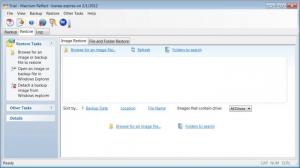
The user interface uses colorful command buttons and tabs for easy navigation. From there, the user is able to select the file types to include or exclude, as well as select the backup location, including a hard disk, network folder, or CD/DVD. The software can intelligently scan a partition, eliminating all the unwanted or obsolete information from the backup copy, like temporary files or folders.
The backup copy can be saved on the hard disk as a file or can be burned directly to a CD/DVD, for restoring it even if the operating system isn't booting any more. Besides creating backup copies out of partitions or files and folders, Macrium Reflect is also able to create rescue discs and can also add a recovery option to the boot menu. It can also convert backup files to the VHD format, for using together with a virtual machine.
The help system can help even the most inexperienced user get familiar with the process of creating backup copies.
Pros
It features a nice looking and practical interface that allows even beginners to create backups. It can also create rescue discs for using in case the operating system cannot boot any more. Besides that, it cleverly scans a partition for eliminating all the unnecessary files and folders from the backup.

Cons
The lack of complex features may not please advanced users. Macrium Reflect is a great program for creating backups of hard disk partitions or files and folders, helping protecting sensitive information.

Macrium Reflect
7.1
Download
Macrium Reflect Awards

Macrium Reflect Editor’s Review Rating
Macrium Reflect has been reviewed by Jerome Johnston on 31 Jan 2012. Based on the user interface, features and complexity, Findmysoft has rated Macrium Reflect 4 out of 5 stars, naming it Excellent







